

Your mobile conversion rate slipped and nobody touched the ads. The Shopify theme settings that hurt conversions switched on the day you installed the theme.
Most founders answer with a redesign quote. The number rarely moves, because the layout never caused the problem.
We manage $1.2B+ in ecommerce revenue across 400+ brand partners, and these switches surface in nearly every store we audit. Defaults survive because nobody owns them after launch.
Our DTC full-funnel growth marketing agency names the seven settings draining your revenue here. We also cover what they cost by revenue stage and how you prove the fix worked.
Our free Shopify store audit reads your theme, mobile funnel, and speed scores.

Part One. Your Theme Made Seven Conversion Decisions For You
What counts as a theme setting, and why did yours survive the build?
The Shopify theme settings that hurt conversions are switches in the editor that change what shoppers see without any code. Animations, hero sizing, block order, search, and cart layout all live there.
Launch has a finish line and settings do not. Your team fixed what looked broken, then left forty switches alone.
Dawn, Horizon, and premium themes each ship different defaults
Shopify shipped the Horizon collection of free themes in May 2025, built on nested blocks. New stores increasingly land there, so the Shopify Horizon vs Dawn mobile performance question matters to anyone who rebuilt this year.
| Theme family | What ships switched on | What it costs you |
|---|---|---|
|
Dawn |
Scroll reveals, hover effects, tall hero |
Buy button pushed down, mild mobile drag |
|
Horizon |
Richer motion, web component runtime, search index |
Heavier mobile payload, slower first interaction |
|
Premium themes |
Sliders, countdowns, popups, quick-view overlays |
Compounding script weight and conflicts |
Shopify documents the mechanism, since the theme settings panel controls fade-in reveals and hover effects globally. You install nothing for these to run.
Why is my mobile conversion rate so low compared to desktop?
You reviewed the theme on a laptop and your customers buy on phones. Smartphones drove roughly 78% of retail site visits in Q3 2025 and around 70% of orders.
Mobile punishes weight desktop absorbs. Shopify theme load speed impact on overall site performance hits mid-range Android first, where your ad traffic lives.
What most brands get wrong about theme settings
Four beliefs cause most of the damage we find in inherited stores.
- A fast theme means a fast store, when the theme only sets your starting score
- Settings are cosmetic, when block order decides what shoppers see at the buy moment
- Defaults only matter to new stores, when an older build hides more untouched switches
- Fixing this needs a developer, when zero code Shopify conversion rate optimization for control is the point
Part Two. What Untouched Defaults Cost You Right Now
Your buy button sits below the fold on the device carrying most of your traffic
Theme authors size heroes for photography, not for selling. On a phone, that hero plus the announcement bar pushes price, reviews, and add to cart off the first screen.
Your shopper works before buying. Every scroll loses someone you paid to acquire.
Three of the four things marked on that page are theme settings, not copy problems. You did not write the layout that buried the reviews, but you own the switch that moves them.
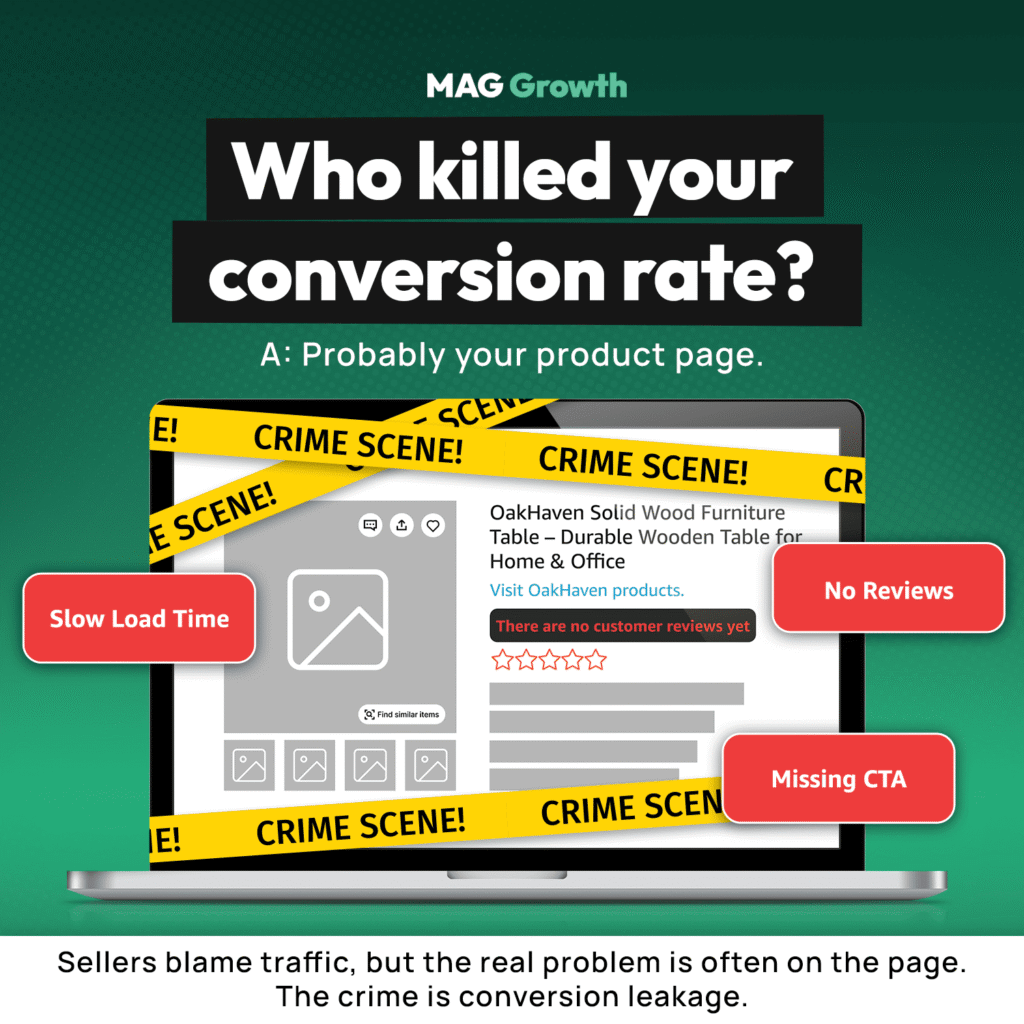
You pay peak CPMs to load animations
Motion costs you latency. Google and Deloitte’s Milliseconds Make Millions study tied a tenth of a second of mobile speed to 8.4% more retail conversions and 9.2% higher order value.
Run it against your numbers. On $300,000 a month, that is roughly $25,000 spent on scroll reveals nobody requested.
A theme update reverted the settings you already fixed
The mechanics are narrower than the panic online suggests. Shopify copies theme editor customizations into the updated version, which covers your settings.
Direct code edits carry the risk. So do theme updates overwrite Shopify customizations? Editor settings travel, custom CSS and Liquid often do not.
What this costs at $1M, $10M, and $20M
- At $1M you lose a weekend of revenue, so fix it yourself and move on
- At $10M you distort your ad math, since weak conversion raises blended acquisition cost
- At $20M the cost of Shopify abandoned checkouts for your profit margins outruns any creative test
Nearly 70% of ecommerce carts get abandoned, and friction your shopper never notices feeds that number.
Our team runs a Shopify CRO audit, finds the settings costing you conversions, and hands you the fix list.
Part Three. 7 Shopify Theme Settings That Hurt Conversions and How to Fix Them
These are the Shopify theme settings that hurt conversions most often, ordered by revenue impact. Settings one through three are quick wins, while five through seven are the ones almost nobody catches.
1. Scroll animations and hover effects left switched on
Every reveal delays content the browser already downloaded, so your shopper waits on decoration. Motion also fires on tap on a phone, which reads as lag rather than polish.
Open Theme settings, then Animations, and switch off scroll reveals and hover effects. Choose reduced motion if your brand needs movement, then run PageSpeed Insights on a product URL before and after and read the mobile score.
2. Oversized hero media pushing the buy button below the fold
Theme authors size heroes for photography, not for selling. On a phone, that hero plus the announcement bar pushes price, reviews, and add to cart off the first screen, and every scroll loses someone you paid to acquire.
Select the product information block, drop the top padding toward zero, and step the main media down one size. Shorten the announcement bar, then test on a real phone rather than the editor preview, since Shopify theme speed vs conversion rate matters less when the button is hidden.
3. Stock block order burying reviews under the description
The default template leads with your marketing copy and puts your proof underneath it. Buyers hesitate over risk rather than features, so a shopper who cannot find your star rating searches elsewhere and often never returns.
Drag the rating block under the title, then lift shipping and returns above the long description. Your native Shopify trust badges setup for rapid scalability belongs beside the price, not beside the footer.
4. Predictive search running on a catalog too small to need it
Shopify caps predictive search at ten results across all result types, which earns its weight on a deep catalog and wastes it on a shallow one. The Shopify predictive search performance impact is a script loading on every page for a feature few shoppers ever trigger.
Switch to basic search in Theme settings, then check your search usage in analytics to confirm you lost nothing. Keep predictive search on only when site search drives a meaningful share of your sessions.
5. A product category too narrow to support native swatches
Native swatches depend on category metafields, and the product category you select enables the color attribute your theme reads. Pick one that is too narrow and the swatch disappears with no error, which is why sellers ask why did my Shopify swatches stop showing.
Widen the product category, then confirm the color metafield connects to the variant option before you touch the theme. Small catalogs can skip the whole problem by switching the variant picker to a dropdown.
6. Cart type set to a separate page with recommendations off
Sending shoppers to a new page mid-purchase adds a step nobody needs and drops the surface where your easiest upsell lives. Shopify requires a theme section for product recommendations to appear, so the feature sits dark in stores already paying for it.
Open Theme settings, then Cart, switch the cart type to a drawer, and enable recommendations inside it. Track attach rate and AOV for four weeks to measure Shopify mobile cart layout return on investment.
7. Theme customizations built in code instead of the editor
Shopify carries your editor settings into an updated theme, but custom CSS and Liquid edits often do not survive. Any team that fixed conversion problems in the theme files pays for the same fix again on every release.
Duplicate your live theme before any update, since Shopify lets you add the new version to draft themes and review it first. Log every setting you change in a shared file and build in the editor rather than the theme files.
Common execution mistakes
- Editing core theme files instead of adding blocks
- Changing five settings at once, which destroys attribution
- Publishing live instead of testing a duplicate
- Installing an app for a setting your theme already exposes
- Calling the result after four days
If You Came From Amazon, Your Theme Habits Will Cost You
Seller Central fixes the layout for you. You optimize the main image, title, bullets, and A+ content, and Amazon decides the rest.
That habit follows brands onto Shopify. You keep improving assets and never touch the container, because on Amazon it was never yours.
Shopify hands you the container, so audit theme settings the way you audit a listing. Our ecommerce builds team runs this pass and usually finds more revenue than another creative round does.
What Changed When One Amazon Brand Fixed Its Storefront
A pet toy brand came to us with 92% of revenue sitting on Amazon and no way to reach its buyers. The marketplace interface blocked bundles, upsells, and any view of buyer behavior.
We prioritized the owned storefront rebuild. Product pages answered real buyer questions instead of listing specs, a guided finder replaced generic browsing, and curated sets gave shoppers a reason to buy on the site.
Revenue grew 78% in nine months, and the store carried 52% of online sales by month nine. Lifetime value ran 4x higher than the brand’s Amazon customers.
Seven settings will not produce those numbers alone. They clear the friction that caps everything you build on top.
How to Measure Whether the Settings Actually Moved Anything
KPIs to track after a theme settings change
| Metric | Where to find it | What good looks like |
|---|---|---|
|
Mobile conversion rate |
Shopify Analytics, split by device |
Gap to desktop narrowing weekly |
|
Add to cart rate |
Shopify Analytics or GA4 |
Rising on pages you edited |
|
Mobile PageSpeed score |
PageSpeed Insights |
Higher after each single change |
|
Cart attach rate |
Cart drawer reporting or GA4 |
Any lift from a zero baseline |
Split every number by device before you judge it. A blended figure hides the improvement you just made.
When Should I Check Metrics After a Theme Change?
Track performance weekly at first, then move to monthly checks. Shorter makes you react to noise, longer leaves a bad change live through an ad cycle.
How to test Shopify theme changes conversion comes down to isolation. Change one setting, split traffic evenly, wait for significance.
What to Do Once Your Defaults Are Clean
- Test one setting per two-week window and date every entry
- Send paid traffic to purpose-built landing pages, not your homepage
- Watch how AI-referred shoppers convert against search traffic
- Weigh Shopify theme changes vs full redesign cost only after two clean cycles
More CRO Resources From MAG Growth
Each attacks a different bottleneck between traffic and revenue.
- Landing page optimization fixes the pages your ads point at
- Ecommerce builds rebuilds structure when settings cannot save it
- Ongoing maintenance stops updates reverting work you paid for
- Creative production fills the blocks once you fix the order
- Brand identity supplies trust signals that cut hesitation
- Technical SEO turns recovered speed into Core Web Vitals gains
- GEO structures pages so AI engines cite you
- Our guide to Shopify conversion rate optimization walks the full diagnosis
- The nine fixable mistakes behind a low conversion rate covers problems outside the theme
- Shopify conversion rate benchmarks gives you category numbers
Shopify Theme Settings That Hurt Conversions FAQs
Should I migrate from Dawn to Horizon?
Skip it while you run paid traffic hard. Horizon earns its place during a planned rebuild, but you migrate manually because the architectures do not translate.
Does a paid theme convert better than a free one?
Not by default. Paid themes save build time, so free vs paid Shopify theme conversion depends on what you configure.
Do animations slow down Shopify stores enough to matter?
They cost you through speed, not taste. A tenth of a second moved retail conversions 8.4% in the Google and Deloitte study.
What happens to my customizations during a theme update?
Shopify copies your editor settings into the new version. Custom CSS and Liquid carry the risk, so review the update as a draft first.
How do I check which Shopify theme I am using?
Open Online Store, then Themes, and read the name and version. Without admin access, view your page source and search for the theme name.
Is a Shopify redesign worth it, or should I adjust settings?
Adjust settings first. A redesign burns months and resets your data, while a settings pass takes an afternoon.
Where do I find a Shopify theme optimization checklist?
Work the seven Shopify theme settings that hurt conversions above as your checklist, top down. Book a Shopify CRO audit before you hire a Shopify conversion consultant.
How long before these changes show in the data?
Give it two to four weeks. PageSpeed moves immediately, but conversion rate needs sessions before it means anything.
Key Takeaways and Your Next Step
- Defaults are decisions someone else made
- Mobile carries the cost, not desktop
- Editor settings survive updates, code often does not
- Change one setting, then measure
- Settings beat redesigns on speed and risk
Own the brand and wear every hat? Start with settings one through three today, since they need no developer.Came from Amazon? Start with settings five and six, because you already pay for both features.
You hire nobody to learn what your theme costs you. The audit is free, we ask no commitment, and you keep the findings.
Our CRO team audits your theme settings and shows you what each one costs you in orders.