

What does your margin do when the right customer buys the right product on the wrong storefront? That question sits underneath how to plan BFCM email sends across Amazon and Shopify, and most brands never answer it.
They send one Black Friday email, link it to whichever page loads, and let a referral fee decide the outcome. The customer converts, revenue looks fine, and nobody spots the margin that went missing.
We manage $1.2B+ in ecommerce revenue across 400+ brands, on the marketplace side and the owned side of the same businesses. Most agencies only ever see one of those two ledgers.
Our agency talks about full-funnel growth marketing across both storefronts and the per-order gap between them. We also cover the Brand Referral Bonus, inventory gates, post-purchase routing, and how to track email revenue from Amazon sales.
Part One — Why Your Peak Email Sends Quietly Cost You Margin
The send does not cost you the money. The destination you attach to it does.
What happens when your Amazon listings and your Shopify store run the same sale?
You bid against yourself with your own audience. Running Amazon and Shopify promotions at the same time hands every subscriber two ways to buy, and only one of them pays you full freight.
Most teams treat the link as a build decision. Ask how do Amazon and Shopify sales cannibalize each other and the answer is forty unwritten calls a season.
Why does the same customer earn you less on Amazon?
Amazon charges you rent on a customer you already owned. Amazon referral fee vs Shopify processing fee is the first line item to compare, and the referral fee runs 8% to 15% by category with most categories sitting at the top of that range, according to a 2026 breakdown of Amazon seller fees.
Shopify Payments charges a fraction of that. A $100 domestic card order on the Basic plan costs about $3.20 to process, per current Shopify per-sale fee data.
A harder question follows. You do not own customer data selling on Amazon, and that gap costs you every future send rather than only this one.
Three misconceptions to clear before you plan anything.
- The fee gap is not the whole gap
- Amazon is not always the loser
- Revenue parity is not margin parity
Part Two — The Margin Math That Decides Where the List Goes
Instinct gets this wrong, because the two channels sit closer together than operators expect. Run the numbers once in September and reuse the answer all quarter.
Channel contribution compared, per order
This table models a $100 order in a 15% referral category. The email costs the same either way, so acquisition cost drops out and fees, fulfillment, and data ownership decide the winner.
| Line item | Amazon | Shopify |
|---|---|---|
|
Retail price |
$100.00 |
$100.00 |
|
COGS |
-$20.00 |
-$20.00 |
|
Referral or processing fee |
-$15.00 |
-$3.20 |
|
Fulfillment and shipping |
-$6.00 |
-$8.00 |
|
Net contribution |
$59.00 |
$68.80 |
|
Customer data retained |
No |
Yes |
The gap comes to $9.80 per order, which lands lower than most operators expect once you count FBA economics honestly. At 1,000 peak orders that is $9,800, and at 10,000 it pays for a full-time hire.
When does sending your list to Amazon actually win?
More often than a DTC agency will admit. Understanding the Amazon Brand Referral Bonus and how it works matters here, because enrolled brands earn credits averaging around 10% of the sale price on purchases their tagged external marketing drove.
On our $100 order that credit runs roughly $10 and erases the $9.80 gap outright. The bonus varies by category and needs Amazon Attribution tags, and the attribution window runs up to 14 days, so tagged links keep earning after the click.
Two conditions flip the answer. A stockout leaves Amazon as the only channel that can fulfill, and a listing chasing rank converts external traffic in a way your site cannot match.
Treat the ranking argument carefully. Traffic alone does nothing, since external visits only move rank when they convert into sales, and Amazon publishes none of the multipliers circulating in seller forums.
Send-plan targets by revenue stage
At $1M to $5M, write one default per SKU before November and you have hit the target. Brands at this stage split sends by accident, and fixing that alone recovers real margin.
At $5M to $20M, the target moves to measurement. Full-funnel growth marketing reads both storefronts as one P&L, so you should know your blended contribution margin per send within a week rather than rebuilding it in January after your retention math already baked in the wrong assumption.
Send us your per-order economics on both channels and we will tell you which storefront your list should point at before Black Friday, with no obligation.

Part Three — How to Plan BFCM Email Sends Across Amazon and Shopify, Step by Step
Five steps fit inside one working session. Take them in order, because each step narrows the decisions in the next.
Step 1 — Calculate your per-order margin gap
Rebuild the table above with your own numbers, one row per top-ten SKU. Use each SKU’s real referral rate instead of a blanket 15%, since tiered categories swing several points on a one-dollar price change.
Then subtract your expected Brand Referral Bonus rate if you enrolled. Whatever survives is the number that justifies every routing call you make this quarter.
Step 2 — Assign a default channel to every SKU
Write one default per SKU into a shared sheet, not into someone’s head. Flagship products with deep owned-store margin default to Shopify, while clearance stock, thin-margin lines, and anything chasing rank default to Amazon.
Keep the offer identical across both storefronts. A coherent offer and identity stops shoppers price-checking you against yourself, which loses you an order you already paid to win.
Step 3 — Build the inventory gate and redirect rule
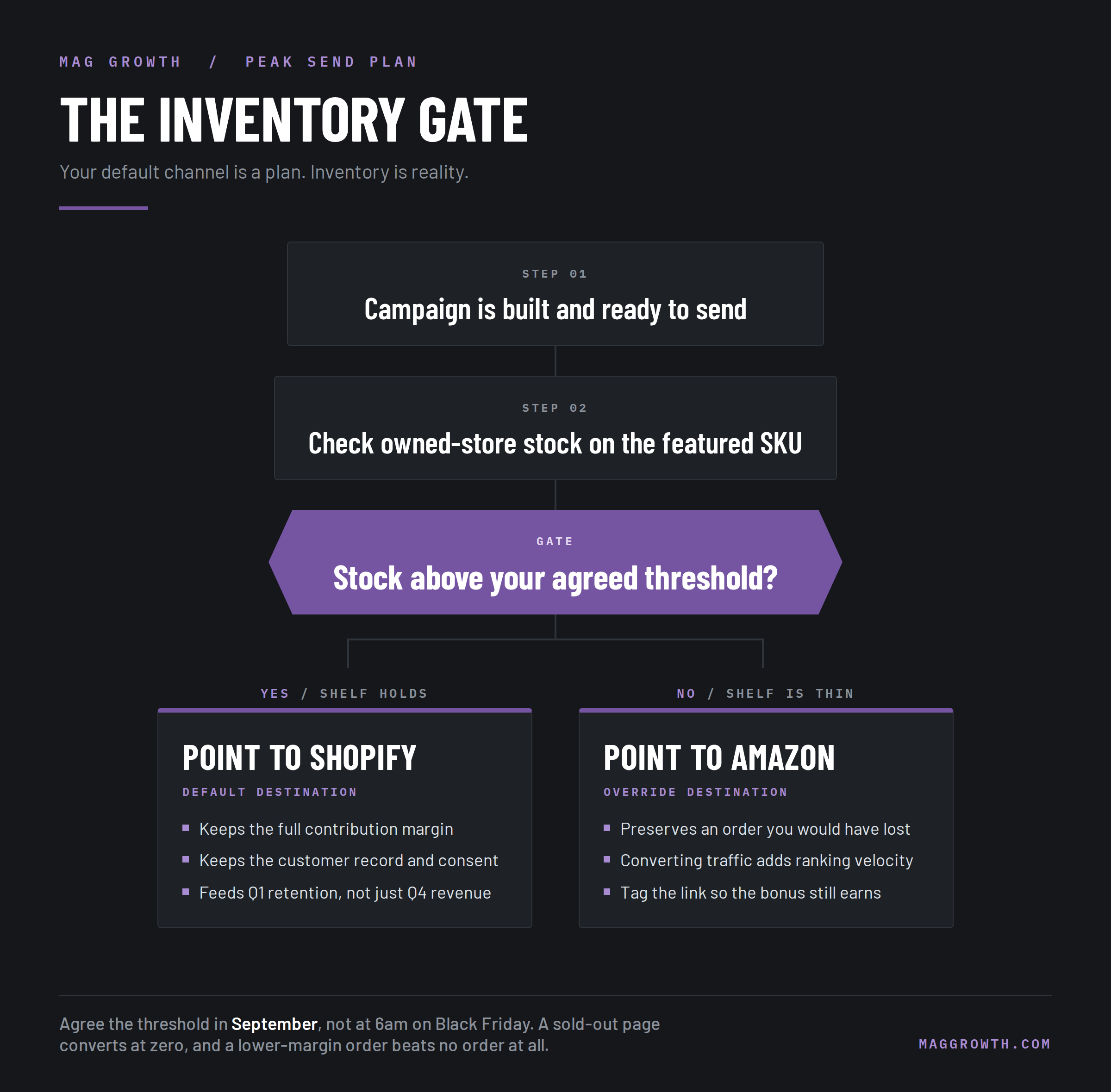
Your default channel is a plan and inventory is reality. Set a stock threshold on the owned store below which the send points at the marketplace listing instead, and agree that threshold before the week gets busy.
Stock position has forced this call for our clients more than once, and it moves faster every time the rule already exists. The case study below shows it in action, and it worked only because the storefront and inventory logic supported a fast switch.
Step 4 — Sequence the sends across the peak window
Sequencing beats splitting. Sending half your list one way and half the other halves your signal on both, so point each send at one destination and vary that destination across the calendar.
| Window | Where the send points | Why |
|---|---|---|
|
Early November |
Shopify |
Warm the list, capture full margin early |
|
Pre-Black Friday tease |
Shopify |
Early access rewards owned subscribers |
|
Black Friday to Cyber Monday |
Split by SKU default |
Deal weekend, inventory decides |
|
Cyber Monday to mid-December |
Amazon |
Prime shipping cutoffs and gift urgency |
|
Late December |
Shopify |
Rebuild first-party data before Q1 |
Treat that calendar as a starting template. Adjust the middle rows first, because your inventory position and ranking goals differ from the average brand there and nowhere else.
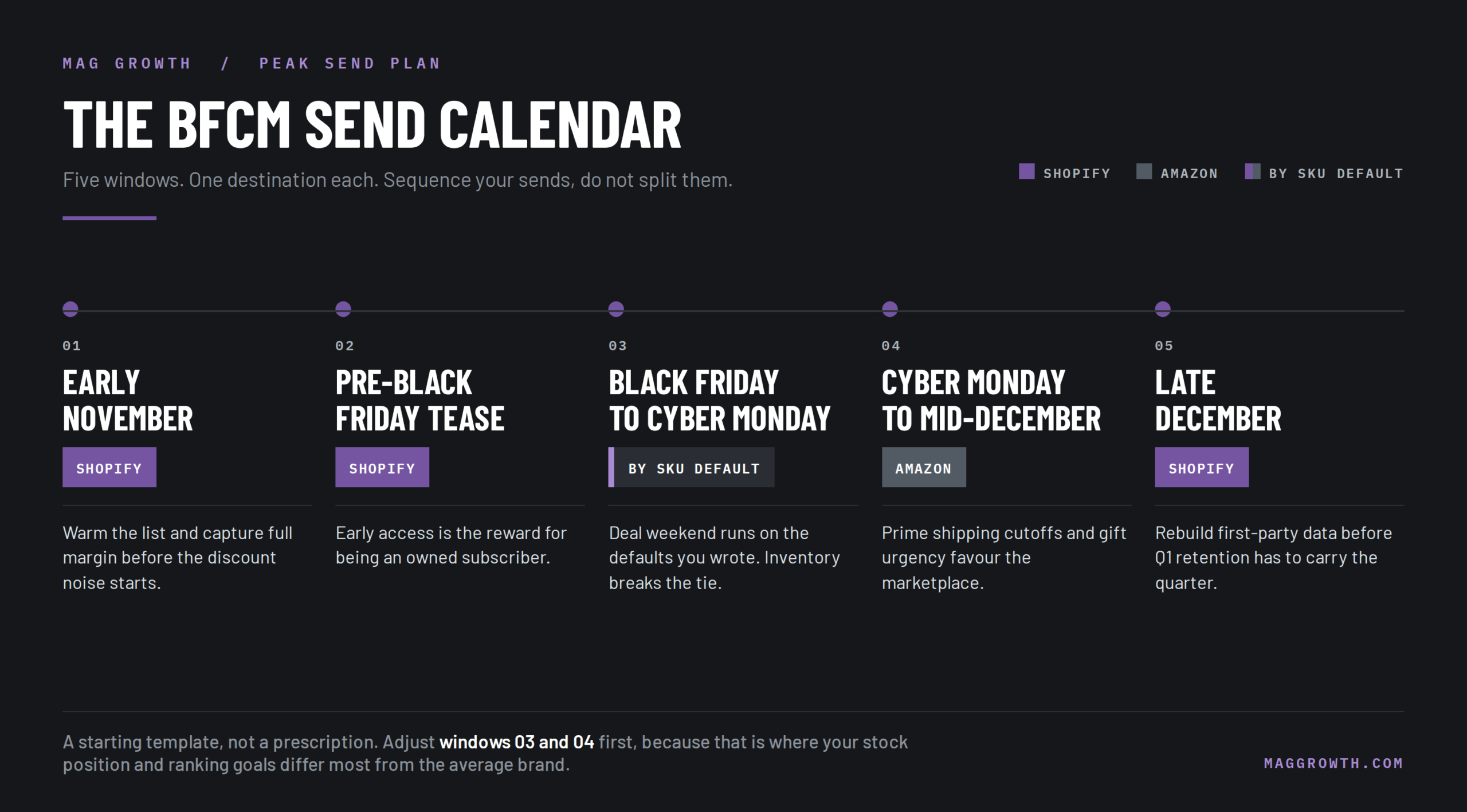
Date runs one axis and engagement runs the other. Give your most engaged subscribers the direct-site window first, since they buy at full margin without a marketplace nudge.
Build any Black Friday email send schedule for sellers inside the tool that executes it. Your email and lifecycle program holds the destination logic, since a shared doc nobody opens holds nothing.
Step 5 — Route and suppress buyers after purchase
Amazon buyers and Shopify buyers need different follow-up, and you hold contact rights over one group only. Amazon policy on emailing customers off platform prohibits any message whose real purpose is marketing, and Amazon limits proactive messages to what completes the order or serves the customer.
None of that stops you pointing a send at a marketplace listing. You email a list you collected on your own site with consent, and you decide where the link goes.
So run the Amazon side as a one-way push and the Shopify side as a relationship. Your retention program earns its keep here, turning December buyers into a January cohort instead of a one-time spike.
Common execution mistakes we see every peak season.
- Splitting one send across both destinations
- Leaving flow discounts live during sitewide sales
- Forgetting Attribution tags on Amazon links
- No stock threshold agreed in advance
- Discounting a buyer from hours earlier
- Judging the weekend on revenue alone
We will map your SKU defaults, your inventory gates, and your send calendar in one working session, before the calendar fills up.
When Inventory Set the Send, Not the Calendar
A gourmet snack brand came to us holding excess stock near expiration with no sell-through plan. Their send calendar suited a normal month, not inventory carrying a deadline.
We ran a 48-hour flash-sale sequence with urgency-led subject lines and countdown timers, paired with social retargeting. Inventory position set the offer and the timing, which is the same trigger the gate in Step 3 uses at peak.
What the gourmet snack brand campaign returned in two days.
- $3,300 recovered in 48 hours
- Top 30 Best Seller Rank achieved
- Zero expired inventory waste
- 34% open rate on the campaign
Note the Best Seller Rank. The same owned-list push that cleared the stock also moved marketplace rank, which is the ranking-velocity argument from Part Two landing inside a single weekend.
Measuring the Peak Send Plan
Revenue tells you the weekend happened. Contribution margin tells you whether it earned its place.
KPIs to track by channel
Track contribution margin per send rather than revenue per send. Pair it with revenue per recipient on each destination, so you can see when Amazon sends convert better and still pay you less.
Tagged Amazon Attribution links answer how to track email revenue from Amazon sales, and nothing else does. Everything else guesses and calls itself a dashboard.
Reporting cadence and tools
Read the numbers weekly through November, not once in December. Klaviyo covers the owned side and Amazon Attribution plus your Brand Referral Bonus report cover the marketplace side, and the two reconcile only if you tagged links before sending.
Expect a lag on the Amazon figures. Bonus credits post well after the sale, so Cyber Tuesday does not give you a final contribution margin.
Advanced Tactics Once the Fundamentals Hold
Using owned demand to drive marketplace ranking velocity
Once the send plan holds steady, spend owned demand deliberately to buy rank. Schedule tagged sends into a specific ASIN during the lead-up weeks and you build converting velocity while competitors still write subject lines.
Send it to an engaged segment that would have bought anyway, never to traffic you bought or incentivized. Amazon reads conversion rather than clicks, so manufactured velocity gives the rank back as fast as it earned it.
Full-funnel growth marketing makes that velocity look earned rather than bought. Coordinated paid media and content and link building generate the branded search and external traffic that support it.
More Resources on Peak Season Email and Multichannel Selling
FAQs About BFCM Email Sends Across Amazon and Shopify
Should I send my email list to Amazon or my website on Black Friday?
Default to your website unless a SKU carries a ranking goal or a stock problem, because your own checkout keeps the margin and the customer record. A modelled $100 order shows a $9.80 gap, which adds up at peak volume and stays close enough that the exceptions matter.
Does sending email traffic to Amazon improve organic ranking?
Only when those visitors buy. Rank responds to sales velocity and conversion rather than raw sessions, so traffic that does not convert changes nothing.
What is the Amazon Brand Referral Bonus and does it close the margin gap?
It credits back part of your referral fee on sales your tagged external marketing drove, and in a typical category it closes the gap almost entirely. Amazon describes the bonus as averaging about 10% of the sale price, so check your own category rate before routing sends on that assumption.
Can I email my Amazon customers directly?
No, and treating post-purchase messaging as a marketing channel gets accounts restricted. Amazon permits proactive messages only when they complete the order or serve the customer.
How many emails should you send during BFCM?
Cover each offer change and stop where your engaged segments stop absorbing. Volume no longer works as the lever it once did, since Klaviyo reported discount rates falling 10% year over year while consumer spending rose 11% across BFCM 2025.
What do I do if my Shopify store sells out mid-campaign?
Trigger the redirect rule from Step 3 and point live links at the marketplace listing. A stockout page converts at zero, and a lower-margin marketplace order beats no order.
Do I lose customer data when a subscriber buys on Amazon?
You lose the right to market to them afterward, and that loss compounds. Amazon owns the order relationship, so the opt-in before the click stays your only durable capture point.
Should I run different offers on Amazon and Shopify?
Vary the mechanics, match the headline value. Shoppers who price-check you across both storefronts should find the same deal depth, or you train your best subscribers to buy on the channel you would rather they skipped.
Your List Is an Asset, Not a Coin Flip
You make this call on every send, not once a season. Knowing how to plan BFCM email sends across Amazon and Shopify turns forty small guesses into one written rule.
- Model the per-order gap by SKU
- Write one default channel each
- Let inventory override the default
- Tag every marketplace link properly
- Judge sends on contribution margin.
Brands that win peak do not send the most email. They decide in September where each send goes and why, which is what full-funnel growth marketing looks like when it reaches the calendar.
Bring us your two storefronts and we will build the SKU defaults, the inventory gate, and the send calendar with you, with no obligation and nothing to prepare.