

You dropped your target ROAS on Black Friday morning last year and the account spent fine. You plan to repeat that move, which is the problem.
Google changed two things since then. Anyone working out how to adjust Google Ads bids for BFCM from last year’s playbook runs a plan built for a system that behaves differently now.
We manage $1.2B+ in ecommerce revenue across 400+ brands as one full-funnel growth marketing program. Our team makes this call dozens of times each Q4, and it goes wrong more often than agencies admit.
This paid media playbook names what changed, the margin math that picks your lever, and five steps that schedule it. It also covers the case where changing nothing wins.
We read your account against your contribution margin and name the lever that fits.

Part One. Google Ads Changed Your Bidding Twice Before This Peak
Two changes landed between June and August 2026. One adds a tool most accounts lack, the other reaches every account on target-based bidding.
What changed in Google Ads bidding before Q4 2026?
Google shipped a peak-season tool and rewrote how budget-limited campaigns spend.
Google Ads promotion mode arrived on June 15, 2026 inside a wider Smart Bidding update, as Search Engine Land reported at launch. It schedules a temporary change to your ROAS tolerance plus extra daily budget, then reverts itself when the window closes.
The second change skipped every Q4 playbook written this year. From August 17, budget-limited campaigns began delivering closer to their stated tCPA or tROAS instead of beating them, and Search Engine Roundtable’s worked example tracks a $10 target CPA with $5 actual performance moving toward the $10 figure.
Do Google Ads CPCs increase on Black Friday?
They do, less violently than Meta, and that tells half the story.
Daily CPC across the five days from Thanksgiving to Cyber Monday ran about 12% above early November, according to Tinuiti’s BFCM recap. Shopping climbs harder, with Q4 Shopping CPCs sitting 25 to 30% above baseline.
Most operators miss the other half. Average order value from Google search ads rose about 4% year over year across those same days, so revenue per click climbs too, and a blanket target cut ignores the increase that partly funds the other one.
Why does last year’s Black Friday bidding plan misfire now?
It assumed a system that overdelivered against loose targets, and August ended that behavior.
Operators set a soft target, let Smart Bidding beat it, and pocketed the gap as margin. Timing failed them too, because they edited on Black Friday morning and forced a relearn on the highest-volume day of the year.
What do operators get wrong about Promotion Mode?
They call it a rebranded seasonality adjustment, and it does something else entirely.
Google’s Ads Product Liaison corrected that publicly, as PPC Land documented. A seasonality adjustment tells Smart Bidding to expect a conversion rate shift, while Promotion Mode changes tolerance and budget across scheduled dates.
Hold three points before you touch a setting.
- It is not a seasonality adjustment
- It does not replace budget planning
- Beta access does not justify using it
Part Two. The Margin Math That Picks Your Lever
Working out how to adjust Google Ads bids for BFCM comes down to two numbers you already own. Contribution margin sets the ceiling, and conversion volume decides whether you touch anything.
Which bidding lever fits which situation?
Match the lever to the signal you hold, not the feature you read about.
| Lever | Use it when | How it backfires |
|---|---|---|
|
Seasonality adjustment |
You can name the conversion rate change and the dates |
You guess the percentage and Smart Bidding overcorrects |
|
Promotion Mode |
You want a self-closing tolerance and budget lift |
You schedule it with no margin headroom and buy losses |
|
Neither |
Conversion volume runs thin or margin holds no room |
You forfeit a few points of peak volume |
That third row fits more mid-market accounts than the first two combined. Most brands discount deeply enough that no tolerance remains, which makes holding steady the best Google Ads bid strategy for Black Friday more often than the field admits.
How far can you loosen your ROAS target before you lose money?
Divide one by your contribution margin, then rebuild that number at peak discount depth.
A 50% contribution margin puts break even ROAS at 2.0. Apply a 30% sitewide discount and that floor climbs to 3.5, because the discount leaves the cost side untouched.
Amazon’s advertising team frames the same test cleanly, arguing that ROAS only means something against break-even, and our breakdown of the eight levers that raise your ad ceiling walks the contribution margin math in full. Loosening a target below your discounted break even ROAS for Black Friday buys revenue at a loss.
What should your peak bidding target be at your revenue stage?
Your stage decides how much of this you should attempt.
- Under $1M, change nothing and fix your offer
- At $1M to $5M, run one adjustment on your strongest campaign
- At $5M to $20M, pick one lever per campaign type in October
- Above $20M, run a controlled October test first
Conversion volume gates this, not revenue. Google’s published floor for Target ROAS is 15 conversions in the past 30 days, though targets only stabilize nearer 30 to 50 a month in the accounts we run.
Volume makes a peak decision readable. One fishing kayak brand we work with grew website revenue 98% in eight months on Performance Max and Search while its Amazon category fell about 50%, taking paid search clicks from 11,000 to 39,000.
Part Three. How to Adjust Google Ads Bids for BFCM, Step by Step
Five steps land before November. None happen on Black Friday morning.
Step 1. Check whether Promotion Mode is in your account
Ten minutes in September settles which half of this playbook applies to you. Finding out on November 20 pushes teams into frantic manual edits mid-peak.
Open a Search or Performance Max campaign running tROAS, check the bidding settings, then check your recommendations feed. Ask your Google rep when the option stays hidden, because the rollout moved gradually.
Watch one flag. Promotion Mode runs as a beta in select countries, so an account without it works normally, and a seasonality adjustment covers the same ground manually.
Step 2. Recalculate break-even ROAS at peak discount depth
Your everyday break-even number misprices the Cyber Five. The discount moves your floor before you touch a setting.
Take contribution margin per order, subtract your planned discount, then divide one by what remains. Credit the order value lift too, since the Tinuiti figure above shows peak AOV rising year over year.
Gross margin standing in for contribution margin raises the flag. Shipping, fees, and returns leave before ad spend reaches the pool, so skipping them flatters your floor by several points.
Step 3. Pick one lever and commit to it
Two levers at once leave you no way to read which one moved the account. A written decision survives Friday afternoon panic.
Run the routing table against your two numbers. Name the conversion rate change and the exact dates, and a Google Ads seasonality adjustment for Black Friday becomes your lever.
Choose Promotion Mode instead when you want a self-closing window and hold the beta. Choose neither when nothing fits, then record that in the Q4 plan.
An invented percentage raises the flag. Pull last November’s conversion rate against your October baseline, and treat a number you cannot produce as proof the lever does not fit.
Step 4. Schedule the window against the Cyber Five
A scheduled window pulls the decision out of the week when everyone runs tired. Build the calendar in October and set the dates once.
| Window | Dates | What you do |
|---|---|---|
|
Test |
Oct 1 to Oct 20 |
Run one controlled change and read it |
|
Ramp |
Oct 20 to Nov 15 |
Step budgets up, leave targets alone |
|
Peak |
Nov 26 to Nov 30 |
Your scheduled lever runs untouched |
|
Revert |
Dec 1 |
Confirm targets and budgets returned |
Thanksgiving falls on November 26 in 2026 and Cyber Monday on November 30, so schedule against those dates. Lock the setup on November 24 and change nothing after it.
Lock the setup on November 24 and change nothing after it. Promotion Mode layers a three to fourteen day window inside a campaign total budget, documented when the feature first surfaced in testing, which covers the Cyber Five and rules the tool out for a one-day flash sale.
Step 5. Set the revert and the guardrails
A window that earns in November costs you in December when nobody closes it. Guardrails stop a good decision turning expensive.
Move budget in increments several days apart, and name the owner of the revert before the window opens. Promotion Mode closes itself, while a seasonality adjustment waits for whoever set it.
Large mid-window edits raise the flag. A Google Ads learning phase budget change during Cyber Week resets learning on the exact days you saved for, which mirrors what our breakdown of why Meta ads ROAS drops covers on the other channel.
Seven mistakes we watch brands repeat.
- Changing targets on Black Friday morning
- Cutting the target below discounted break even
- Stacking a seasonality adjustment on Promotion Mode
- Guessing the conversion rate percentage
- Leaving a manual CPC cap active
- Running a loosened target into December
Our paid media team maps your levers, dates, and revert plan in one session, with no obligation.
Performance Max and Shopping at Peak
Performance Max holds most ecommerce Google budget, and the answer diverges there.
Does Promotion Mode work the same in Performance Max?
Google offers it for Performance Max as well as Search, though the read gets harder.
PMax spreads spend across channels, so a loosened tolerance moves money where you cannot isolate it. Test one campaign before you apply a Performance Max Black Friday bidding strategy account-wide, and fix the Google Merchant Center feed first, because a stale feed wastes the tolerance you paid for.
What should you do with Shopping campaigns during Cyber Week?
Protect the feed and the budget first, then consider the target.
Shopping CPCs climb harder than Search, so Performance Max versus standard Shopping for the holiday season splits into two decisions. Choose per campaign type instead of pushing one account-level change.
Our Google Ads team runs feed and bidding as one workstream, because the two break together and break fastest in November.
Measuring the Peak Bidding Decision
Which KPIs tell you the lever worked?
Contribution margin per order answers this, not dashboard ROAS.
- Contribution margin per order, daily
- Blended MER across paid channels
- Impression share lost to budget
- New customer share of orders
Platform ROAS during a discount weekend measures your discount as much as your bidding. Full-funnel growth marketing reads blended numbers instead, because a channel view scales the campaign that sold most at the least profit.
What reporting cadence and tools work during peak week?
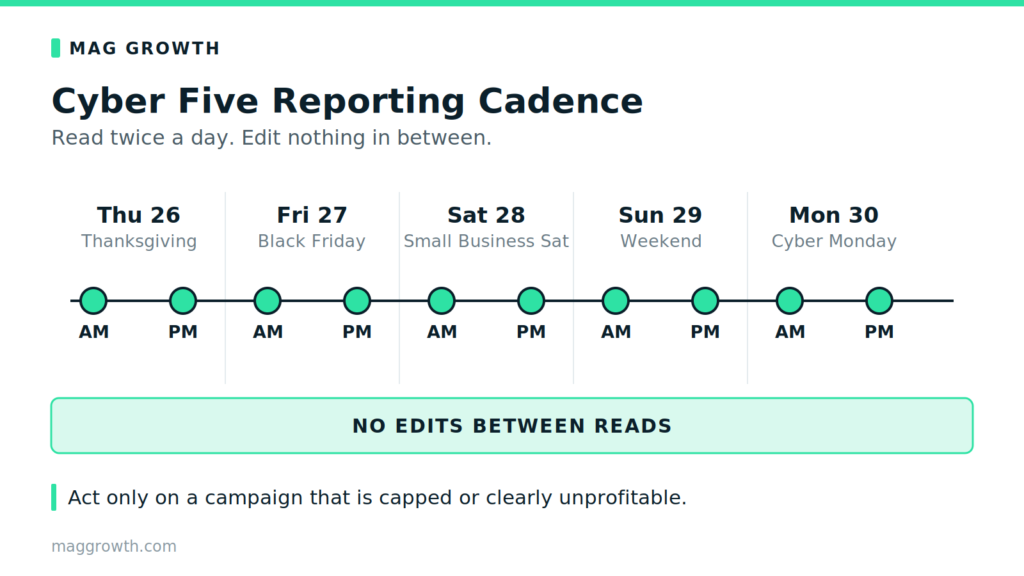
Pull pacing twice a day through the Cyber Five and edit nothing between reads.
Watch impression share lost to budget and cost per conversion morning and evening, then act only on a capped or unprofitable campaign. Hourly numbers talk you into edits you regret, because a shopper who clicks Thursday night often buys Friday morning.
Conversion lag means Cyber Monday closes late, so hold your verdict until the following week.
Advanced Tactics Once the Fundamentals Hold
How do you run a controlled bidding test before committing peak budget?
Test in October, on one campaign, at low stakes.
Pick a campaign with steady conversion volume, apply your chosen lever, then hold everything else still for ten days. You test your own account’s response rather than Google’s product claims.
Read the result against contribution margin, not platform ROAS. Full-funnel growth marketing judges a lever on business profit, and the 42% CAC reduction we drove for a DTC brand came from the same habit of isolating one variable.
More Paid Ads and Peak Season Resources
Each of these feeds the same decision on how to adjust Google Ads bids for BFCM.
- 8 levers that increase ad spend without hurting margin for your margin ceiling
- Meta ads vs Google ads vs TikTok ads for channel priority
- The DTC paid media glossary for the metrics named here
- TThe complete guide to Meta ads for ecommerce for the other half of the plan
- How to improve conversion rate for DTC stores because a loose target needs a page that converts
- How to improve customer retention and LTV for what the peak cohort earns later
- Our Amazon BFCM strategy on the My Amazon Guy side when you sell on both storefronts
Our paid media team runs these calls as one full-funnel growth marketing program, not five channel silos. Meta ads and social ads apply the same peak logic where creative fatigue outruns bidding.
Programmatic ads buy cheaper reach before the auction turns expensive. Creative production keeps that pipeline full, because no lever rescues an ad nobody stops for.
How to Adjust Google Ads Bids for BFCM FAQs
Should I lower my ROAS target for Black Friday?
Lower it only when your discounted break even ROAS still sits below the new target. Anything under that floor buys losses.
What is Google Ads promotion mode?
It schedules a window that relaxes your ROAS tolerance, adds budget, then reverts itself. Google launched the beta on June 15, 2026 for Search and Performance Max.
Promotion mode vs seasonality adjustment, what is the difference?
A seasonality adjustment signals an expected conversion rate change. Promotion Mode changes tolerance and budget across set dates, and Google corrected that confusion publicly.
How do I know if I have Promotion Mode?
Check bidding settings on a Search or PMax campaign running tROAS, then your recommendations feed. Many accounts still lack it, because the beta covers select countries.
When should I use seasonality adjustments in Google Ads for Cyber Week?
Set one in October for the exact dates you expect conversion rate to move. Short windows beat covering a whole month.
What changed in Google Ads Smart Bidding in August 2026?
Budget-limited campaigns on tCPA or tROAS now deliver closer to your stated target instead of beating it. Review any target you set loose on purpose.
Should I use manual CPC instead of Smart Bidding for Black Friday?
Manual CPC caps throttle delivery when you need volume most. Keep Smart Bidding and control the outcome through your target and budget.
Should I use Promotion Mode on Performance Max?
Cover the promotion and stop, which for most brands means the Cyber Five. The window runs three to fourteen days and sits inside a campaign total budget, so set the budget first and the window second.
What happens if I change my ROAS target mid-Cyber-Week?
You risk a partial relearn on the most expensive days of the year. Anyone working out how to adjust Google Ads bids for BFCM decides in October and lets the schedule carry it.
One Lever, Scheduled Early
- Two Google changes hit this peak
- Contribution margin sets your floor
- Pick one lever, not two
- Schedule the window and the revert
- Changing nothing counts as deciding
Our Google Ads management team sets the lever, schedules the window, and owns the revert, so your peak runs to a plan.